
Products Part 3 Product Data
Products will be split over 3 parts to allow us to dig deep in to the vital areas.
Part 3. The main meat of the product is within the Product Data options, this is a massive, deep part of the subject that will be split over multiple topics.
Selecting the appropriate type of product is vital to open the relevant options for your product.
If you are adding an item of clothing for example, with multiple sizes and colours, a ‘Simple Product’ just will not give you the options required. Unless you are adding many ‘Simple Products’ each having their own size and colour to display them all within your shop.
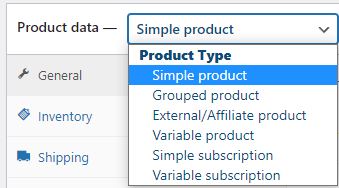
Types Of Products
There are many ‘Types’ to choose from, depending on any additional features you requested for your website.
Here, we will discuss the first 4 types in the drop down.
- Simple Product – The quickest and easiest product to add, one single product with no size/colour options. Unless you have asked for a customisation additional feature. This is also the option to choose if your product is a virtual or downloadable product.
- Grouped Product – This allows you to create a ‘Grouped Product’ of 2 or more of your other products. This is ideal if you have a specific design style on numerous items, so your customers can simply select each of the various items from one single page and add them to the basket.
- External/Affiliate Product – This is a handy tool if you are an affiliate for an external organisation. If you can generate specific affiliate marketing links to their products, you can add all of the details here, including the affiliate link.
- Variable Product – Variable products are what you may have seen on numerous other online stores. If you have ever visited a ‘T-shirt’ product page and had to make your selection from the available options such as size and colour, then this is a variable product. Any products where the customer can choose between the variations sits in this option.
Now we are going to break each product type down a little, and explain the main Sub-Sections.