
Adding Shipping to your store
Shipping.
Any online store owner needs to have a strong thing about the shipping methods that they want to have incorporated within their store. Shipping can be a huge necessity to allow you to sell items a little cheaper as shipping costs are covered during the checkout. However, as mentioned earlier in this learning series, shipping can also put customers off from completing checkout. I have done some research in to this field, and found that a rather large percentage of online shoppers just wont buy an item if they have to pay a shipping fee. They would rather buy from somewhere else where the item may be a little more expensive to get the free shipping. Other customers would happily pay shipping if it was less than £2.50, and a very small amount of customers barely look at shipping costs, as long as the items are cheap enough.
My take away from this, is that it is much better to add a small amount on to each product price to cover your shipping costs, and offer ‘Free Shipping’ during checkout to make your customers think they are getting something for nothing. Some people have the complete opposite opinion on this, which is perfectly fine. I’m happy 100% as long as it works for you and your store.
So, Shipping from your stand point is a very easy system to incorporate.
The options available are;
- Click and Collect – From a central location, we can incorporate a date and time for pickup selection system for your customers during checkout. The options available to the customer will only be days and times that you have discussed with us during the build.
- Free Shipping – This removes all costs for shipping during checkout, free shipping is set up as standard, but hidden, for use with any potential future coupon codes.
- Flat Rate – This can be called what ever it is that you like, and it will have 1 set price, regardless of the item being bought.
- Shipping Classes – During the build phase, we will have discussed shipping, and if you chose to have varying shipping fees for different products, we will incorporate them as shipping classes.
Shipping classes are used to select a certain shipping cost during checkout, depending on the product added. It does however open up some further choices for you to make.
- Per basket – If 2 or more items are added, the checkout will choose the most expensive shipping class )Shipping Fee) to add for shipping.
- Per Product – If 2 or more products are added to the cart, the checkout system will add each of the shipping classes for each of the products. This can soon roll the overall prices up and scare your customers away.
If you decided to go down the ‘Shipping Classes’ route, then read on to see how to add them to your new products as you add them.
Adding Shipping Classes to New Products.
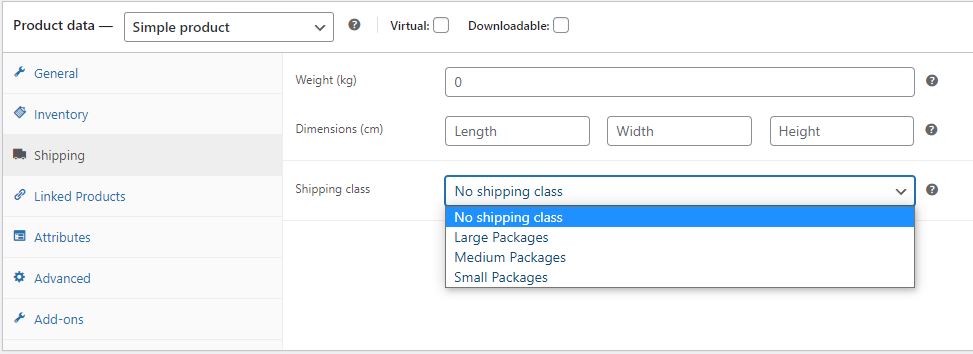
Choosing the Shipping Class per product
As you can see from the image above, once you add a new product and are working through the product data, one sub-section is shipping. You can enter the details as you wish, but the drop down box will contain the options that we have previously discussed during the build. There can (Within Reason) be as many shipping classes as you require. Each cost can be different.
So, as far as shipping goes, this is all you need to think about when adding new products, if you did choose the different shipping class per item system.
If you require any further help, please do get in touch.